How to Get Your Business on ChatGPT: What We Learned Claiming Ours
In short: on 10 November OpenAI launched Businesses in ChatGPT, and with it ChatGPT Business Hub: a free beta that lets an organisation take ownership of its profile inside ChatGPT. When we searched for Innermedia, a profile was already there. Claiming yours lets you fix the details and, once verified, see some basic numbers. It doesn’t buy you a better spot in ChatGPT’s answers, and some features are still US only.
Ask ChatGPT for a web agency in Hertfordshire, a family solicitor or a prep school with boarding, and it will usually name a few organisations. Until now, none of them had any way to shape what it said. ChatGPT Business Hub is OpenAI’s first attempt at a fix: a place to claim your listing, edit it and track how often ChatGPT points people your way. If you want to know how to get your business on ChatGPT, this is now the starting point.
The audience is big. OpenAI puts weekly ChatGPT users at 1.2 billion. So we went to claim Innermedia’s profile, and worked through OpenAI’s help pages and the first reviews from people trying it. This is what we’d tell any client, with notes for schools where their situation is different.
Does ChatGPT already have a profile for your business?
We expected to start from a blank form. Instead, a search for Innermedia brought up a ready-made listing: our Cuffley address, office number, opening hours, a 5.0 star rating and a category. Nobody at Innermedia had created it. ChatGPT had assembled it from information already online.
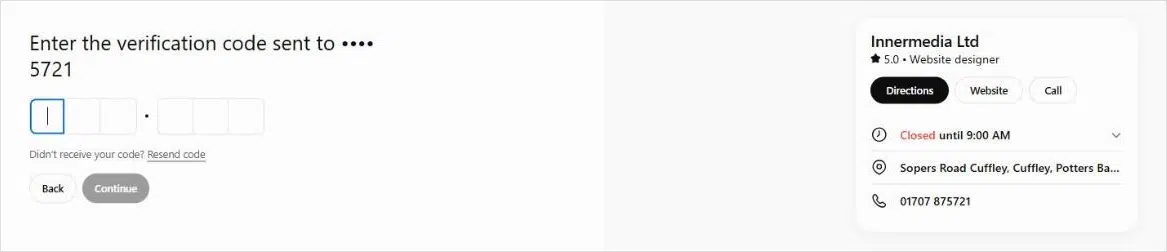
That’s worth knowing even if you never claim anything. OpenAI’s terms let it publish and update listings on its own, using whatever sources it has. If your old phone number or a former address is floating around online, it may be on your profile now.
It also answers a question the help pages leave open. They say physical businesses like shops and restaurants can only claim existing listings in the US. Our listing is in the UK, and Business Hub let us begin the claim without any trouble.
What is ChatGPT Business Hub?
Business Hub is the dashboard behind Businesses in ChatGPT, OpenAI’s programme for letting organisations manage how they appear in ChatGPT. There are two pieces to it:
- The profile. The card people see when they click a business name in a ChatGPT answer. You control the website link, description, category, logo and cover image. Retailers can also connect a product feed.
- Business Agents. An optional assistant trained on your own information, which a user can chat to from your profile. These are currently open only to eligible online businesses in the US.
Verified profiles get a blue tick. The nearest comparison is a Google Business Profile, with one big difference: Google shows a page of options, whereas ChatGPT tends to recommend a short list in a single reply. Being on that list matters more.
Don’t confuse it with ChatGPT Business, the paid workspace plan for teams (once called ChatGPT Team). That’s for your staff. Business Hub is about how customers see you, and it costs nothing. The sign-up screens mention both, which doesn’t help.
How to get your business on ChatGPT: the five steps
- Visit chatgpt.com/business-hub and search for your organisation. Online businesses without a listing may be able to add one.
- Choose the person who’ll own the profile. Colleagues and your agency can be added later, each logging in with their own ChatGPT account.
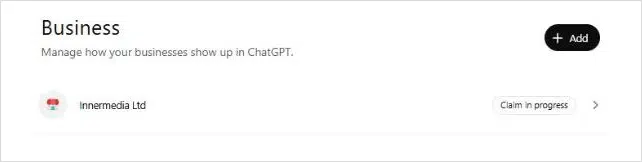
- Prove you’re connected to the business: a code sent to the listed phone number or email, a DNS record on your domain, or a Shopify login.
- OpenAI checks the claim and emails you. Until then you can’t publish anything.
- Pass an ID check with Persona, OpenAI’s verification provider. Expect to show photo ID and your company details.
The ID check is the step that unlocks everything else: publishing edits, the blue tick and your insights. Have the director’s ID to hand, and check that the name and registered address you give match Companies House word for word.
One warning before you hit publish. Once a profile goes live, OpenAI support won’t take it down, so get the wording right at the draft stage.
What should you check before you verify?
Our own listing showed why it pays to look closely:
- The category was off. ChatGPT had filed us as a ‘Website designer’. We do build websites, but a big part of what we do now is AI solutions for schools: AI assistants that answer parents’ questions around the clock, tools that support admissions, and our imHub CRM to track every enquiry, alongside SEO and PPC. A narrow category can quietly shape which questions you turn up for, so it’s the first detail we’ll be correcting.
- The code goes to the listed number. Ours went to the main office line, so whoever picks up needs to know it’s coming. If the number on your profile is out of date, use the email or DNS route instead.
- Write the description in plain English. Say what you do, who for and where, using the same words as your homepage. A clear, consistent description is easier for ChatGPT to repeat accurately.
Key takeaway: if your web developer or IT team controls your domain, the DNS option means waiting on them. A code to the office phone or a shared inbox is usually the fastest route.
For schools: look at the listing as a parent would. The category may be something generic, the hours may be office hours rather than the school day, and the number may ring reception. Agree in advance who signs off as the school’s representative (especially if you’re in a trust or group), and let reception or admissions know a verification code may come through.
What data does Business Hub show you?
A verified profile gets a simple dashboard covering the last 28 days:
- Mentions: how many ChatGPT answers linked to your website. Answers that name you without a link aren’t counted, so the true figure is higher.
- Website clicks: clicks out to your site from ChatGPT. That doesn’t guarantee a page view or an enquiry.
- Discovery topics: the subjects of the conversations where you appeared.
What’s missing is just as useful to know. There are no individual questions or chats, no competitor comparisons and no way to export. If you’re a smaller organisation, expect empty boxes at first: OpenAI only shows figures once there’s enough activity to report.
Back it up with your own tracking. Traffic from ChatGPT normally arrives tagged utm_source=chatgpt.com, so it’s easy to pull out in GA4. Alongside that, keep a short list of questions your customers would type into ChatGPT, ask them every month and record who gets named. Single answers vary, so it’s the pattern over a few months that counts.
For schools: your list should be the questions parents actually ask, such as ‘girls’ schools near St Albans with sixth form’ or ‘prep schools in Surrey offering bursaries’. They’re already asking: in a Good Schools Guide survey of 2,000 parents, 23% said they’d used social media or AI to help choose a school, and among Gen Z parents it was 37%.
What about Business Agents and ChatGPT Ads?
Business Agents can answer questions about your products, services and policies, but they can’t take bookings or payments, and they must say they’re AI. OpenAI’s Business Agents Policy also bans invented prices or reviews, pushy sales tactics and advice that legally needs a qualified professional. For now they’re limited to US online businesses.
ChatGPT Ads let a business promote its agent, with paid placements labelled separately from normal answers, which explains the ad credit offered during sign-up. As UK organisations can’t run agents yet, we’d hold off on budget here for now. When it does open up, start small, with tracking in place from the first day.
Will a claimed profile get you recommended?
Not on its own. OpenAI says plainly that claiming a profile, or paying for ads, has no effect on which businesses ChatGPT recommends, and its terms promise no ranking or traffic. The profile makes sure the facts are right. Being recommended is the job of answer engine optimisation (AEO), and it still comes down to:
- A website that explains clearly what you offer and who it’s for, in text a machine can read rather than images or PDFs.
- Matching information everywhere. Your website, Google Business Profile, directories and ChatGPT profile should all tell the same story.
- Third-party proof. Reviews, press coverage and mentions on other trusted sites carry real weight in AI answers.
- Pages that answer real questions, backed by structured data so AI tools can tell exactly what you are.
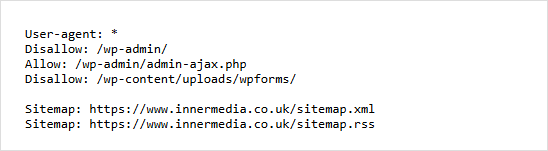
One technical check is worth doing today. Visit yourdomain.com/robots.txt and make sure there’s no rule blocking OAI-SearchBot, the crawler behind ChatGPT search. OpenAI’s crawler documentation is clear that blocked sites won’t appear in its search answers, and fixes take around a day to take effect. Don’t mix it up with GPTBot, which controls whether your content is used for AI training. Ours has no rules aimed at either.
For schools: the things parents most want to know (fees, bursaries, transport, wraparound care, SEN support, entry points) are often tucked away in PDFs or spread across several pages. Give each one a clear page and keep it in line with your ISC and Good Schools Guide entries. Our AI Visibility Leaderboard shows how often independent schools appear in AI answers, and we’ve looked at what the highest-scoring schools do differently in AI search.
Your checklist this week
- Search for your organisation at chatgpt.com/business-hub and see what ChatGPT already says about you.
- If it’s wrong, or someone you don’t know has claimed it, start your own claim or use the ‘Dispute ownership’ option.
- Pick one owner for the profile and gather their ID and your Companies House details.
- Fix the category and write a plain description that matches your homepage.
- Check your robots.txt isn’t blocking OAI-SearchBot.
- Set up ChatGPT traffic tracking in GA4 and start your monthly list of test questions.
- Once verified, record your first 28 days of figures as a baseline.
Final thoughts
Business Hub is early and will change quickly. Agents should spread beyond the US, the reporting will get richer and advertising will grow around it. For now, the big lesson from our own claim is simple: ChatGPT may already be describing your business to people, so it’s worth ten minutes to check what it’s saying.
The bigger shift is that people now ask AI who to hire, buy from or visit, and the organisations it names tend to have clear websites, consistent details and a good reputation elsewhere online. AI supports, but humans connect: the goal is to make the shortlist, then let your team win people over.
Want to know how your business or school appears in AI answers? Request a free digital audit and we’ll show you where you stand and what to fix first.
FAQ
Quick answers to the questions we’re hearing most.